
Leave the connection to us.
The IRC daemon stays on your server while your devices sleep. Routine web-server updates can keep those connections running.
YOUR SERVER. YOUR CONNECTION.
Keep your networks connected. Come back to your history. Pick up the conversation from your browser, desktop, phone, or terminal.
Use the free hosted client, or run your own server.

THE IRC YOU KNOW, WITH ROOM TO GROW
Your server does the staying online. Your clients let you join in wherever you are.
The IRC daemon stays on your server while your devices sleep. Routine web-server updates can keep those connections running.
Search encrypted history, follow unread markers, and jump from a mention or PM notice to the matching conversation.
Multiple networks, familiar commands, SASL, IRCv3, favorite channels, and layouts that work with a keyboard or a thumb.
ONE ACCOUNT. YOUR DEVICES.
Switch between the web client, desktop apps, an installable mobile PWA, and cryptirc-tui. Your conversations and preferences can follow you.

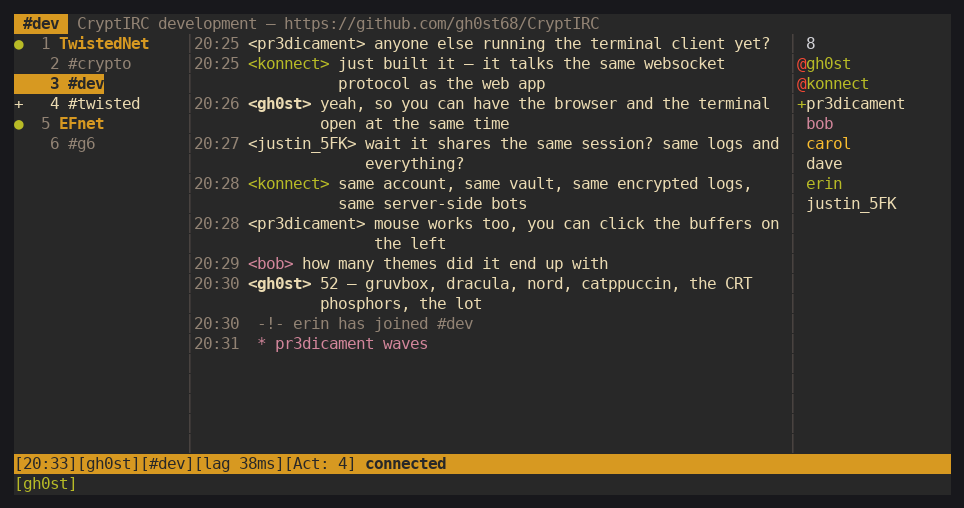
Prefer a terminal? You’re covered.
A CLIENT THAT FEELS LIKE YOURS
227 themes, from quiet editor classics to animated scenes and familiar mIRC, HexChat, XChat, and irssi skins. Adjust fonts and columns, edit a palette, or add your own background.
Explore the theme galleryKNOW WHAT’S PROTECTED
A personal vault protects stored history, credentials, and notes. Compatible clients can add Signal Protocol encryption to private conversations, and shared keys can protect channel messages.
Read about the encryptionPer-user encrypted logs, saved credentials, and private notes.
Optional DM encryption with X3DH and Double Ratchet.
The server handles ordinary IRC traffic and unlocks the storage vault. At-rest encryption does not make all IRC traffic end-to-end encrypted.
THE SERVER STAYS. YOU COME AND GO.
Use the hosted client or your own CryptIRC server, then join the channels you care about.
The persistent IRC daemon keeps working while your laptop and phone are away.
Read history, check Notices, and continue the conversation.
HOSTED OR SELF-HOSTED
Start with the interactive installer for Debian or Ubuntu. It walks through HTTPS, registration, and first-user setup. Arch Linux has its own installer.
Install and update guidegit clone https://github.com/gh0st68/CryptIRC.git
cd CryptIRC
sudo bash deploy/deploy.shLinux server · root access · ports 80 / 443
Arch: deploy/deploy-arch.sh
WHEN YOU WANT A LITTLE MORE
Share the good stuff. Inline media, a GIF picker, uploads, text / HTML / Markdown pastes, and a URL shortener.
Make alerts work for you. PM and mention notifications, custom highlights, conversation mutes, and quiet hours.
Add a helping hand. Optional AI providers, 19 bots, and configurable moderation tools. External services are opt-in.
A FEW THINGS TO KNOW
More questions? Find us in #dev or #twisted on irc.twistednet.org.
Your CryptIRC server holds the IRC connections while your devices are away. Reopen the client to catch up on stored history. The server and IRC daemon need to stay running.
Yes. Add multiple IRC networks to the same account. TwistedNET is one option, and your other networks can sit alongside it.
Logs, saved credentials, and notes use an encrypted per-user vault. Compatible clients can enable Signal Protocol E2E for DMs; shared channel encryption is optional. The server handles ordinary IRC traffic and unlocks the storage vault, so choose a server you trust.
On iPhone or iPad, open the client in Safari and choose Share → Add to Home Screen. On Android, use Add to Home Screen or Install app in a compatible browser. Notification availability depends on browser permission and platform support.
Yes. Interactive installers cover Debian, Ubuntu, and Arch Linux. You need a Linux server with root access and ports 80 and 443 available. The install guide covers setup, updates, registration, and manual installation.
PICK A CHANNEL. SAY HELLO.